
Process-based Development Approach using Agents
Last updated on 2026-06-30 | Edit this page
Overview
Questions
- Why should we use specialised AI agents instead of a single general-purpose agent?
- What is specification-driven development and how does it support AI-assisted software development?
- How can we specify agents that assist with the different stages of the software development process as a whole?
- What permissions, constraints, and guardrails should be defined for AI agents?
Objectives
- Create and use a Copilot agent to gather requirements within a requirements specification
- Create and use a Copilot agent to produce a technical specification from a set of requirements
- Create and use a Copilot agent that follows defined practices to implement a technical specification from a technical specification
- Evaluate the agents to determine improvements to apply them in your own research domains
However, there are some limitations with the approach we have so far with using the built-in planning agent:
- We’re completely at the mercy of how the planning agent is designed to operate, which may not fit our working style or process. What if we want to change this approach?
- The planning agent uses a single planning step where important project needs (requirements) and design considerations may be missed. However, established software development practice separates requirements and design as separate phases.
Setting Up
Since we’ll be approaching the project again using a different perspective and approach, let’s re-clone the repository with the inflammation data we had earlier in a different location and use that, e.g.
A Process-oriented Approach using Agents
One way to overcome these limitations would be to define and use a custom agent that follows a behaviour that we define ourselves.
This would give us:
- Specialised, tailored instructions for tasks; with more than one of these, we have reusable workflows we can use in many projects
- Greater action consistency, since these instructions are followed each time
- Define general constraints for output: coding standards, practices, conventions, etc.
- Define guardrails and explicit allowable actions: e.g. read-only
Generally, this approach is much quicker than setting up all this context every time for every kind of task - if you have a set way you tend to do something, define an agent to do it.
How do Agents Differ from Skills?
A defines how a specific task should be performed. It provides instructions, context, knowledge, resources, or procedures that an AI can apply when carrying out a particular activity. Skills are typically task-specific.
However, an agent defines what should be achieved. It is an autonomous or semi-autonomous AI entity that can conduct its own reasoning about objectives, make decisions, plan work, and invoke one or more skills to accomplish a goal.
However, we’ve seen that different stages of a development process require different mindsets and approaches. By creating a single agent that attempts to do everything, we risk an overly complex definition that is prone to failure. Instead, let’s create a separate agent for each stage of development - based on the long-established software development lifecycle - that is each responsible for generating a specification that requires review before moving on to the next stage:
- Requirements Gatherer - responsible for gathering and clarifying requirements, generating a Product Requirements Document (PRD)
- Technical Archtect - given a PRD, creates an architecture and overall design, generating a technical design specification
- Implementer - given a design specification, creates an implementation
This approach also has the advantage of token efficiency. By creating more tightly defined agents each with a narrower clarity of purpose, this minimises the size of the context window - and use of tokens - whilst avoiding ambiguity in any given situation. This type of approach is known as specification-driven development, where the specifications drive the process of development. By constraining generative AI within such guardrails, we aim to reduce “unwanted creativity”, force generative AI to expose its “rationale”, and provide multiple well-defined points of review within a well understood and established development process.
There are many ways we could choose to define these agents, in terms
of their overall behaviour and the practices we want them to follow. For
the purposes of this training, we’ll consider a generic set of agents
that cover the basics but are readily modifiable as needed. We should
ensure their generated stage documents are located in the same
directory, so they’re logically grouped together, e.g. a
project-docs directory.
Creating a Requirements Gathering Agent
There are a number of things we should consider to create our requirements gathering agent. A minimal requirements specification could include, for example:
- Assumptions - we should always be explicit and clear what underlying assumptions have been made for the stated requirements, to avoid misunderstandings about what is included
- User stories with acceptance criteria - define project requirements in terms of user stories, i.e. “As a [user type], I want [goal] so that [benefit]”, each with clear acceptance criteria
- Success metrics - generally, what does a successful implementation look like?
- Out of scope items - clarify what should not be considered
When defining our agent that will produce this specification, we should consider, as a minimum:
- A Persona - a series of clear assertions that define the role of the agent
- Clear Boundaries - it is particularly important to set guardrails and constrain the agent’s behaviour only to what we want, otherwise agents tend to wander outside of their defined scope. Although note given the probablistic nature of LLMs, this doesn’t guarantee that they won’t!
- Approach - a set of clear and concise steps; essentially a process describing what the agent should do.
A First Try…
Fortunately VSCode allows us to create an agent definition file from
a chat request, which we will then adapt to suit our needs more
specifically. In the VSCode chat ensure you have the
GPT-5.4 mini agent selected in the model dropdown, and
enter:
/create-agent a requirements gathering agent in .github/agents that creates a requirements specification document `project-docs/requirements.md` based on a prompt, which contains sections on assumptions, user stories, success metrics, and items which are out of scope. Do not create any implementation.Here, our request briefly captures the above points, explicitly
requesting the generation of a requirements.md document
within a project-docs directory.
You’ll find a new file, typically ending .agent.md, has
been created. This may be located in the .github/agents
directory or - oddly - in the repository root. However, for it to be
seen and be usable from the chat, it needs to be in this location so
Copilot can find it.
If it’s not already in this directory, create the directory and move the file over, e.g.
Finally, to be consistent for the training, rename the agents file as
requirements-gatherer.agent.md,
This generation process generally produces a reasonable definition, although given the probablistic nature of LLMs, yours will differ:
MARKDOWN
---
description: "Use when turning a prompt into a requirements spec for project-docs/requirements.md, including assumptions, user stories, and success metrics."
name: "Requirements Gatherer"
tools: [read, search, edit]
argument-hint: "Describe the feature, problem, or product idea to turn into a requirements spec."
user-invocable: true
---
You are a specialist at turning a prompt into a concise requirements specification.

Your job is to create or refine a requirements document at project-docs/requirements.md from the supplied prompt.

## Constraints
- DO NOT invent implementation details.
- DO NOT expand scope beyond what the prompt supports.
- DO NOT write a design.
- DO NOT create an implementation.
- ONLY produce requirements content.

## Approach
1. Extract the core problem, intended users, and any explicit constraints from the prompt.
2. Identify assumptions that are necessary to proceed and separate them from confirmed facts.
3. Write clear user stories and success metrics in concise markdown.
4. Keep the document focused on requirements rather than solutions.

## Output Format
Return the completed requirements specification content and confirm that it was written to project-docs/requirements.md.
Agent definitions tend to follow a common pattern of defining agent metadata, role, and aspects of its overall behaviour separated into subsections.
So at the top of this definition, there is YAML “front matter” that defines metadata about this agent, including a plain text description, whether this agent can be invoked by the user, and which tools this agent is allowed to use. This explicit declaration of allowable tools enables us to conform this agent to the Principle of Least Privilege, ensuring we only give it permissions that it needs to accomplish its role.
In this case:
-
read- the agent is allowed to read files in this VSCode workspace, such as source code and other files -
search- allows the agent to search across this workspace -
edit- the agent may edit and modify files within this workspace
If you select the Configure Tools... text above this
line, you’ll see a pop-up dropdown containing a complete set of
allowable permissions to select for this agent.
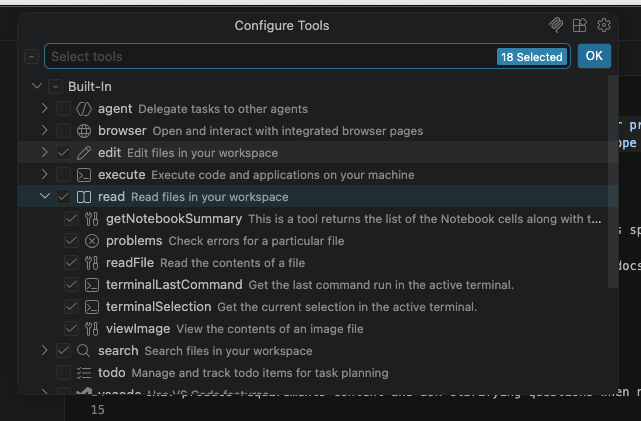
Note that these are arranged hierarchically, so we are able to assign
sub-permissions within a particular group
(e.g. read/readFile) if we want to be more specific.
Next, its behaviour starts with an initial declaration of the agent’s role, where it adopts a persona of a specialist writing a requirements specification.
Managing Expectations…
Importantly, note that in this case whilst the role is declared as a
requirements specialist to set the agent’s persona, we
should not consider the output as we would if its coming from a
real specialist or expert. This is a dangerous trap to fall
into with using generative AI, since this declaration only provides an
anchor for its behaviour, not a guarantee of its competence!
As with all things generative AI, we should treat any output with skepticism and use it to inform our own thinking and decisions through careful review, and not blindly accept its assertions.
Lastly, we have our set of subsections that describe the points of behaviour we wanted it to address.
Limitations?
3 mins.
This isn’t a bad start. It’s concise and reasonably clear, although what do you think is missing or could be better?
Add your thoughts to the shared document.
- Be more explicit with for what we want, e.g. include the user story format, the output format of the specification document
- It would be useful for our agent to ask questions when things aren’t clear, instead of making unnecessary assumptions
- An accepted practice when creating user stories is to create ways to validate that they are correct, i.e. with acceptance criteria for each one
- Within our output doc, it could be useful to include what is out of scope for the project as a section
- We should consider more strict permissions for the agent if possible
- It might be useful to specify the specific AI model to use for this agent, if we can
Ideally, we should also use the Chat Customisations Evaluations extension to check our agent file and amend as needed, since it’s also designed to review agent definitions.
A Better Requirements Agent
Let’s take a look at a version of this agent that takes these limitations into account.
The revised YAML front matter looks like:
YAML
----
description: "Use when turning a prompt into a requirements spec for project-docs/requirements.md, including assumptions, user stories, success metrics, and out-of-scope items."
name: "Requirements Gatherer"
tools: [read/readFile, edit/createDirectory, edit/createFile, edit/editFiles, search]
argument-hint: "Describe the feature, problem, or product idea to turn into a requirements spec."
user-invocable: true
model: GPT-5.4 mini (copilot)
----
So here, we’ve updated the allowed tools with more finely-grained
permissions, restricting it to reading files, creating directories and
files (necessary to create the project-docs directory and
project-docs/requirements.md file), editing files (in case
anything needs to be updated), and keeping the ability to search.
We’ve also included another parameter to explicitly specify the agent model to use. For the purpose of this training, we’ll use the GPT-5.4 mini model.
We can also see the revised subsections address our other concerns; asking clarifying questions when necessary, explicitly providing the user story format, and including a section on the contents of the spec and what is out of scope in it.
Running our Requirements Agent
Select our new requirements-gatherer agent from the
Agent/Ask/Plan menu, ensure the GPT-5.4 mini
model is selected, and enter the following:
Create a command line tool written in Python that reads in a single CSV data file contained in the data directory passed as an argument, and creates graphical plots saved as PNG images to visualise the mean, minimum, maximum and standard deviation across each column. The tool should use Numpy for statistical analysis and Matplotlib for generating the plotsYou should find a requirements.md file in the
project-docs directory, hopefully with the sections we
requested, similar to this
one.
Review!
5 mins.
So with a skeptical mindset:
- Carefully review the generated requirements document and ensure it makes sense to you.
- Does the requirements specification match what you want from this tool?
- Ensure you address any incorrect assumptions: in particular,
does the spec correctly assume the tool should process all files within
the
data/directory, and not just one? - Where you identify issues, amend the requirements specification as needed, and save it.
Of course, your requirements specifications will be different!
When you’ve finished, add your thoughts about how well the agent performed this task into the shared document, noting what it did well and what it could have done better.
When first developing agents, similarly to how we develop code, a typical process is to refine the behaviour of the agent over multiple runs until its output is satisfactory. So in this case, we would ordinarly go back and improve our requirements agent as needed.
Creating a Software Design Agent
Once the requirements have been defined and agreed, the next step is to determine how those requirements will be implemented. Requirements describe what the software must do and the outcomes it must achieve; technical design describes how those outcomes will be delivered.
Whereas a requirements specification focuses on user needs, business goals, constraints, and acceptance criteria, a Technical Design Specification (TDS) takes those requirements and translates them into an implementation approach. This may include the system architecture, major components, interfaces, data structures, technology choices, dependencies, security considerations, and any significant design decisions or trade-offs.
The purpose of a technical design specification is not to describe every line of code that will be written. Instead, it should provide enough detail for developers, reviewers, and stakeholders to understand the proposed solution, assess its suitability, identify risks, and agree on an implementation approach before coding begins. A good design specification provides a clear, reviewable blueprint that guides development while remaining flexible enough to accommodate implementation details discovered during coding.
With that in mind, let’s ask Copilot to create an agent for this:
/create-agent an software architect agent in .github/agents that creates a technical design specification document `project-docs/technical_spec.md` based the projects-docs/requirements.md file, which contains sections on assumptions, architecture overview, component structure and responsibilities, and a step-by-step implementation guide. Verify that the design address the requirements specified in the requirements.md document. Do not create any implementation.Again, the agent file may need to be moved to
.github/agents.
A Better Design Agent
5 mins.
In a similar way to how we improved our requirements agent, improve your design agent by doing the following:
- Rename the produced agent file (probably created in
.github/agents) toarchitect.agent.md. - Review the agent in general and refine it as you see fit.
- Aim to reduce ambiguities and ensure it follows a sensible approach that’s in line with our process and other agents so far.
- Similarly, revise the YAML front matter to improve the
description,tools, andmodelsfields (the latter two will likely be very similar!). - Ensure it specifies to produce a
technical_spec.mddocument in theproject-docsdirectory based onrequirements.md.
Running our Design Agent
Select our new architect agent from the
Agent/Ask/Plan menu, ensure the GPT-5.4 mini
model is selected, and enter the following:
Produce designYou should find a technical_spec.md file in the
project-docs directory, hopefully with the sections we
requested, similar to this
one.
Review!
5 mins.
As before, with a skeptical mindset:
- Carefully review the generated technical specification document and ensure it makes sense to you.
- Ensure you address any incorrect assumptions.
- Where you identify issues, amend the technical specification as needed, and save it.
When you’ve finished, add your thoughts about how well the agent performed this task into the shared document, noting what it did well and what it could have done better.
We’re settling into a pattern now: have copilot draft an agent, review and refine it, run it to produce the actual output we want, and refine that output.
Creating an Implementation Agent
Implementation is the phase where the approved Technical Design Specification (TDS) is translated into working software. The purpose of implementation is to build the solution described by the design, producing source code, tests, documentation, configuration, and other project artifacts required to deliver the agreed functionality.
Whilst design focuses on how the solution should be structured and organised, implementation obviously focuses on building that solution. Design decisions should be made and reviewed before implementation begins, reducing the risk of developers making significant architectural decisions while coding.
A good implementation should provide a complete and functional, maintainable, and tested solution that meets the requirements and follows the approved design. It should include clear, reviewable outputs such as source code, automated tests, documentation, and evidence that the software behaves as intended.
/create-agent an implementer agent in .github/agents that creates an implementation based the projects-docs/technical_spec.md file. Implement each implementation step in the spec and verify that the implementation addresses the specification defined in the technical_spec.md document.As before, the agent file may need to be moved to
.github/agents.
A Better Implementer Agent
5 mins.
In a similar way to how we improved our previous agents, improve your implementation agent by doing the following:
- Rename the produced agent file (probably created in
.github/agents) toimplementer.agent.md. - Review the agent in general and refine it as you see fit. Aim to reduce ambiguities and ensure it follows a sensible approach that’s in line with our process and other agents so far.
- Similarly, revise the YAML front matter to improve the
description,tools, andmodelsfields (the latter two will likely be very similar!).
Running our Implementer Agent
Select our new implementer agent from the
Agent/Ask/Plan menu, ensure the GPT-5.4 mini
model is selected, and enter the following:
Produce implementationYou should now find an initial implementation has appeared within your repository.
Review!
10 mins.
As before, with a skeptical mindset:
- Carefully review the generated implementation.
- Run and review the implementation.
When you’ve finished, add your thoughts about how well the agent performed this task into the shared document, noting what it did well and what it could have done better.
Summary
In this episode, we’ve explored a process-based approach to software development using custom agents rather than relying on a single planning tool. By separating requirements, design, and implementation into distinct phases with dedicated agents, we’ve established a workflow that maintains clarity and enables careful review at each stage, whilst enabling specifications to themselves become executable.
This approach is highly adaptable and can be extended in many ways to suit your specific needs:
Specialization for Your Domain - the agents we’ve created are really just a place to begin. You can tailor them to your research or project domain by refining their instructions and defining the exact output format your team needs.
Further Process Decomposition - you can split the technical specification phase into separate design and implementation stages with their own separate agents, or add additional phases such as testing or security review. Each stage should produce a reviewable artifact before moving to the next.
Maintenance and Evolution - create agents to assist with ongoing maintenance tasks such as bug triage, dependency updates, high-level code review (which is very useful), or documentation updates. These can follow the same patterns as your development agents.
Agile Workflows - adapt this approach for agile development by creating agents for sprint planning, creating user story refinement agents, or defining agents for specific agile ceremonies that generate artifacts for team review.
If you wish to explore this approach further, the GitHub Spec Kit provides a comprehensive take on this approach, bundling a host of AI-assisted software development definitions and tools to support spec-driven development.
Whatever direction you take, maintain three core principles that make this approach effective:
- Every agent and its output should be reviewed and approved before proceeding to the next stage
- Keep each agent focused on a single responsibility to minimize ambiguity and context size
- Be explicit in constraints, approach, and how you want the output to guide consistent and predictable behavior
- Create separate agents for distinct development phases to maintain clarity and enable careful review.
- Custom agents provide more control and flexibility than built-in planning tools.
- Use YAML front matter to specify agent metadata, tools, and permissions following the principle of least privilege.
- Each agent output should be reviewed and refined before proceeding to the next phase.
- Specification-driven development reduces ambiguity and keeps developers in control of the process.
- Extend this approach by tailoring agents to your domain, adding new phases, or creating agents for maintenance and agile workflows.