
All in One View
Content from The AI Landscape
Last updated on 2026-07-06 | Edit this page
Estimated time: 30 minutes
Overview
Questions
- Where does generative AI fit within the broader historical and technical landscape of AI systems?
- How do large language models generate text, code, or explanations without understanding meaning in a human sense?
Objectives
- Recall key milestones in the historical development of artificial intelligence
- Describe where ChatGPT and similar large language models fit within the broader AI landscape.
- Explain, at a conceptual level, what generative AI and ChatGPT are.
- Summarize the primary functions and intended use cases of common AI coding assistants.
Introduction
Software is critical to research - the Software Sustainability Institute’s UK Research Software Survey found that more than 92% of academics use research software, and 56% write their own code.
For many researchers, writing code for data analysis or software development can be boring, frustrating, or intimidating. Most researchers would rather be thinking about and researching their subject matter rather than spending lots of time learning a programming language and writing code. Therefore, with easy access to AI tools, it can be very tempting to ask AI to write your research code for you.
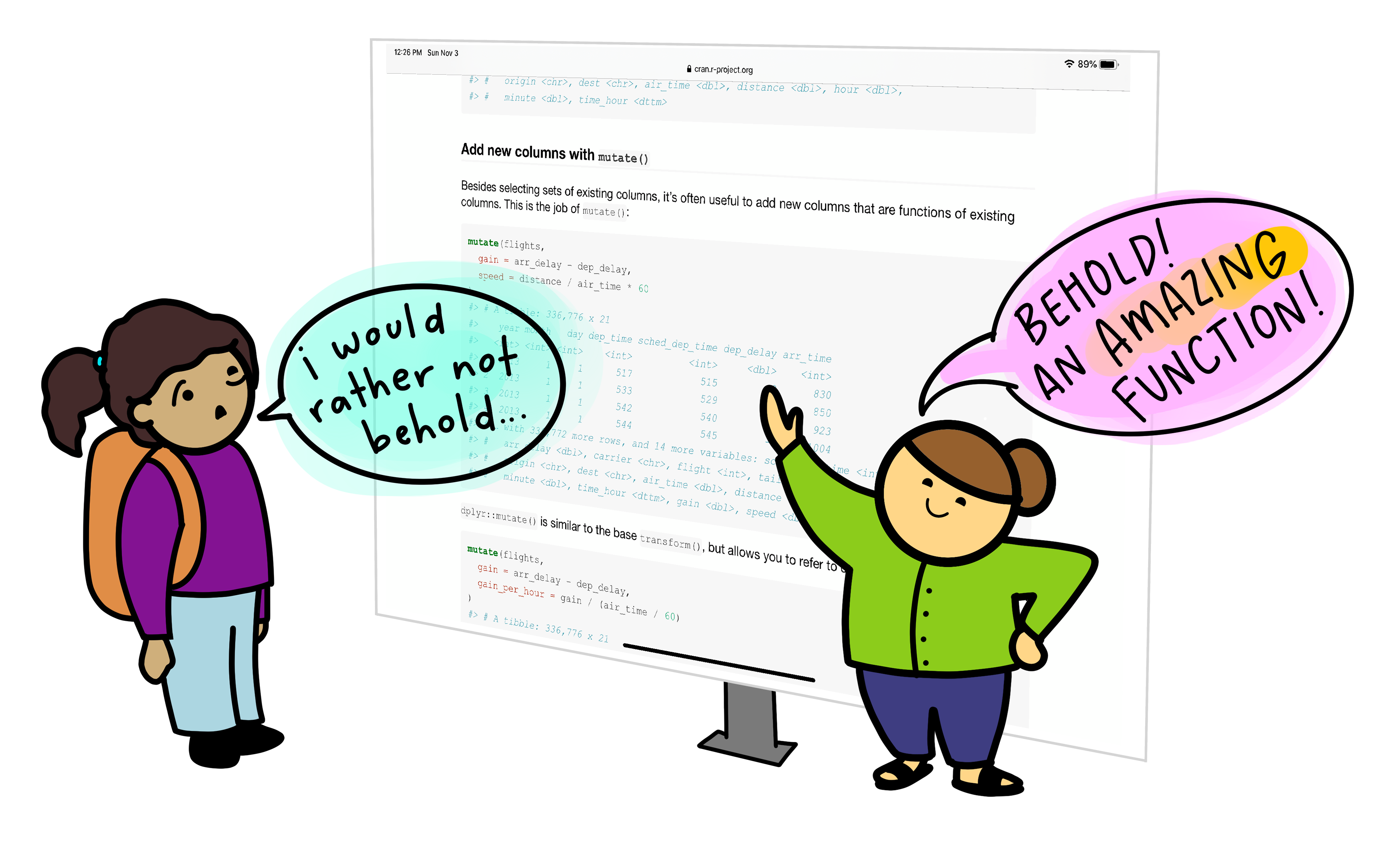
This workshop aims to:
- Demonstrate how AI can assist in coding.
- Raise researchers’ awareness of the potential risks associated with AI-assisted coding.
- Provide researchers with the knowledge and understanding to critically assess when it is appropriate to use AI for coding assistance.
What Do We Mean by AI?
“Artificial intelligence (AI) is the capability of a machine or software system to perform tasks that would normally require human intelligence, such as learning from data, recognising patterns, making decisions, or generating outputs.” - Merriam-Webster Dictionary.
Optional Section: A Very Brief History of AI
Artificial intelligence is best understood not as a single capability or system, but as a broad collection of techniques and approaches for solving different kinds of problems. These techniques have been developed over the past 70 years. Let’s consider a timeline of major AI developments to put the current AI tools into historical context:
1950s–1970s: Rule-based Approaches
AI research began with rule-based approaches focused on logic. Rule-based systems are deterministic, in other words the same inputs always lead to the same outputs, and the rules governing behaviour are explicitly defined. The systems rely on explicitly encoded rules and struggled with anything outside of those rules. Some key milestones for early AI include Alan Turing’s 1950 paper on “Computing Machinery and Intelligence” and the 1956 Dartmouth Conference, where the term “artificial intelligence” was first introduced.
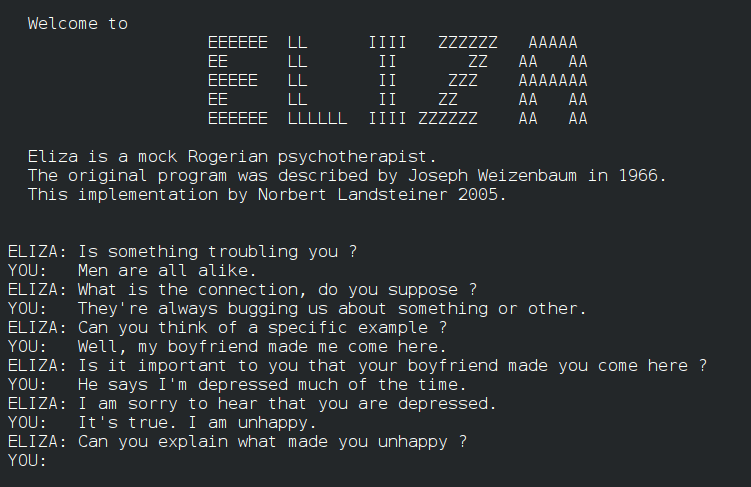
Rule-based chat AI systems existed. An AI chatbot ELIZA was introduced in 1966 to act as a psychotherapist among other purposes. ELIZA processes text inputs and gives a response based on the pre-programmed rules. However, ELIZA differs drastically from the generative AI chatbots we know today such as ChatGPT, because it did not have the capability to respond to any inputs outside of its pre-programmed rules.
Mid-1990s–2000s: Shift to Data-driven Machine Learning
AI research moves toward statistical and data-driven methods. Rather than following fixed rules, these systems use statistical models to learn patterns from data and make predictions, classifications or risk estimates. Their outputs support decisions but do not create new content.
One example of a predictive, data-driven system is a machine-learning model trained to automatically label features in microscope images, such as identifying specific cell types or structures.
The model learns from large sets of images that have been annotated by experts, using features like shape and texture to distinguish between categories. Once trained, it can classify new images, allowing researchers to analyse large datasets more efficiently and consistently than manual methods.

2017-Present: The Emergence and Scaling of Generative AI
The transformer model was proposed in 2017, laying the foundation for modern generative AI (Transformer is the ‘T’ in chatGPT). In 2018, GPT-1 demonstrated that transformer-based models trained on large amounts of text can perform a wide range of language tasks through pre-training and fine-tuning.
In November 2022, ChatGPT was released by OpenAI and this introduced generative AI to a broad public audience through a conversational interface. Following the public release of ChatGPT, generative AI rapidly became embedded into widely used tools and platforms, including code editors, office software, search engines, and data analysis environments (e.g. AI “copilots”).
Generative AI systems are designed to produce new outputs that resemble the data on which they were trained. This includes generating text, code, images, or other media. It’s important to note that generative AI systems are statistical models that work on probabilities. Therefore, the same input will not always produce the same output.

Current AI Landscape
We can roughly categorise AI systems into rule-based, predictive, generative AI systems. They are all used for different purposes and each has strengths and limitations.
| AI System Type | What the system does | Strengths | Limitations |
|---|---|---|---|
| Rule-Based & Decision Systems | Follows clearly defined rules to allow, block, or trigger actions | Predictable and transparent; behaves the same way every time; well suited to safety-critical or regulated settings | Cannot adapt to new situations or handle uncertainty |
| Predictive & Analytical Systems | Uses data to estimate categories, trends, or likelihoods | Can analyse large datasets efficiently; supports consistent analysis and forecasting | Results depend on data quality; outputs are probabilities, not final answers |
| Generative Systems | Creates new text, code, images, or other content | Flexible and easy to interact with; useful for drafting, coding, and exploring ideas | Outputs can sound confident but be incomplete or wrong |
ELIZA
In the past, rule-based chat AI systems existed. An AI chatbot ELIZA was introduced in 1966 and trained to act as a psychotherapist among other purposes. ELIZA processes text inputs and gives a response based on the pre-programmed rules. However, ELIZA differs drastically from the generative AI chatbots we know today such as ChatGPT, because it did not have the capability to respond to any inputs outside of its pre-programmed rules.
Human Oversight Across AI Systems
Human responsibility increases from rule-based to predictive to generative systems because more judgment, interpretation, and accountability must be carried by people rather than the system itself.
- Rule-based systems behave exactly as specified and therefore the responsibility is mostly in system design, not in day-to-day interpretation.
- Predictive systems give estimates, not decisions and the responsibility lies with humans for interpretation and validation.
- Generative systems require the highest human responsibility at the point of use. For example, when a researcher uses generative AI to draft text, summarise literature, or generate code, the responsibility for correctness remains entirely with the human.
Demystifying Generative AI
What Is GPT?
The model of generative AI that has been widespread in recent years is GPT. GPT is an AI model that can produce coherent and context-aware text, such as explanations, summaries, or responses to questions.
GPT stands for Generative Pre-trained Transformer:
- Generative: GPT is designed to generate new content. Rather than retrieving fixed answers from a database, it produces original outputs, such as text or code.
- Pre-trained: it is trained on vast amounts of data before deployment.
- Transformer: this refers to the internal design of the neural network that helps the system keep track of context across longer pieces of text.
ChatGPT is an application built on top of GPT models. It provides a user-friendly, conversational interface to interact with the GPT model. ChatGPT is one of many tools that use GPT.
GPT is also integrated into software products such as Microsoft’s Copilot, search engines, and coding environments.
Optional Section: Understanding Large Language Models
Systems like GPT belong to a group called Large Language Models (LLMs). An LLM is a program that learns how language works by analysing very large collections of text. It does not store facts in a database or follow pre-programmed rules. Instead, it learns patterns in how words, sentences, and ideas tend to appear together.
LLMs are built using neural networks. In this context, a neural network provides the underlying learning machinery that allows the system to absorb information from large amounts of text and improve its predictions over time. The type of neural network used by GPT is a transformer. The key strength of the transformer model is the ability to consider context (how different parts of a sequence relate to one another) when processing or generating information.
For example, when interpreting the meaning of a pronoun such as “it”, the transformer can look back across the sentence or paragraph to determine which earlier word is most relevant. Consider the sentence “The cat ate the mouse because it was hungry.” The transformer model is able to see that “it” refers to “the cat”, not “the mouse”. This might seem minor, but this was a major breakthrough in AI generating coherent text.
Tokens
GPT doesn’t simply retrieve pre-written sentences, but instead builds content step by step (or token by token) and this is why it can generate such flexible and novel outputs. When GPT is building content it does so using tokens. A token can be a word, part of a word, or a punctuation mark. Tokens are decided on during training by merging frequently occurring character sequences until a fixed vocabulary size is reached.
Consider the sentence:
“The dataset was cleaned.”
Internally, the model might split this into tokens such
as:The| data | set |
was | clean | ed |
.
Tokens do not necessarily align with meaning or syllables because tokenisation is statistical, it’s based on which characters tend to appear together, rather than based on any rules of language. This explains why prompts that seem similar to us humans can produce very different outputs.
Understanding tokenisation allows us to appreciate a key limitation of GPT: the model optimises for what is likely to follow, not for what is correct, so early token-level errors can influence the rest of the response.
When you enter a prompt into GPT:
- The model looks at the input text (the prompt) and splits it into tokens.
- It predicts the probability of each possible next token based on all previous tokens.
- A token is chosen based on the model’s predicted probabilities. Either the most likely token is selected, or one is sampled from the distribution of probable tokens to allow more varied or creative outputs.
- The token is added to the growing output sequence.
- Steps 2–4 repeat until the model produces a complete response.
- The tokens are decoded back into human-readable text.
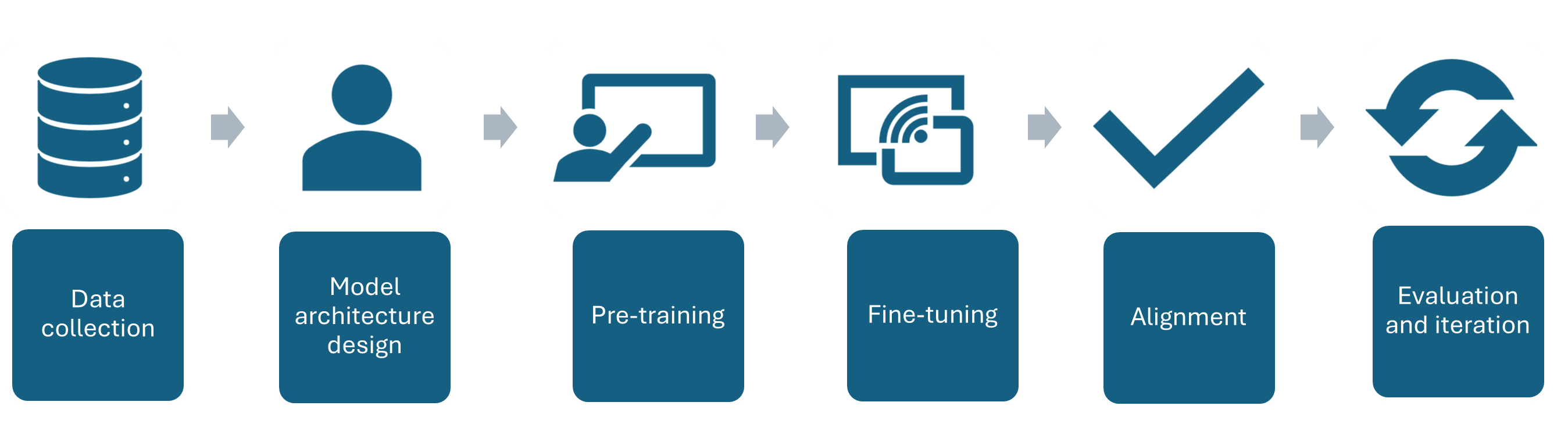
How a GPT Model is Trained
- Data collection - A large amount of text is gathered to train the AI model on.
- Model architecture design - The neural network architecture is designed to best suit the purpose of the AI
- Pre-training - The AI model is trained on the collected text.
- Fine-tuning - Further training the model on specific datasets and tasks related to its purpose e.g. if it is going to be a code assistant it will be trained on tasks related to code generation.
- Alignment – Guide the model so that its outputs are helpful, safe, and in line with human intentions. This often involves human feedback to encourage responses that are accurate, reliable, and appropriate.
- Evaluation and iteration - Testing the AI in a variety of use cases, getting feedback and iterating the model architecture to improve performance.
Overview of AI tools that can support research coding
AI-Assisted Coding Tools
ChatGPT – A conversational large language model by OpenAI that can generate code, explain programming concepts, assist with debugging, and support data analysis workflows.
GitHub Copilot – AI-powered coding assistant integrated into code editors, suggesting code completions, functions, and boilerplate across multiple programming languages.
Google Gemini – Google’s AI platform for research and coding assistance, capable of generating code, providing explanations, and supporting data analysis and workflow tasks.
Claude – A conversational AI by Anthropic designed to assist with coding, writing, and research tasks, providing explanations, summaries, and code generation support.
Microsoft Copilot – Integrated into Microsoft tools like Word, Excel, and Visual Studio, this AI assistant helps with code generation, data analysis, and workflow automation.
Which tools are most commonly used by researchers?
A 2025 study of 868 scientists who code as part of their research found that ChatGPT was by far the most common tool used to assist with research coding, used by 64% of participants, followed by GitHub Copilot, used by 12% of participants.
Levels of AI-Assisted Coding
The Oxford AI Competency Centre suggest thinking about AI-Assisted Coding as existing in four levels of differing complexity and capability.
Level 1: Code Snippets (Copy and Paste) A Large Language Model inside a chatbot generates code that you copy and paste into files or environments you manage yourself. Examples: ChatGPT, Claude, Gemini, GitHub Copilot Chat
Level 2: Canvas and Artifacts (Integrated Execution) LLM writes code inside a chatbot and immediately runs it within the chat interface, creating interactive applications you can use and modify in real-time. Examples: Google Gemini, Claude Artifacts, ChatGPT Canvas
Level 3: Agentic App Builders (Full Application Development) LLM-powered services that plan and execute the entire development process, from concept to deployed application, handling multiple files, frameworks, and deployment automatically. Examples: Lovable, Bolt, v0 by Vercel, Google AI Studio
Level 4: Agentic IDEs (Professional Development) AI-powered development environments that assist with complex, multi-file projects, handling entire codebases, version control, and sophisticated development workflows. Examples: Cursor, GitHub Copilot, Claude Code, Google Colab
This workshop will stick to Level 1. The intermediate-level course Developing Research Software with AI Tools addresses how you would work within Level 4.
What is your experience of using AI tools for coding?
Which AI tools have you used to help with coding so far, if any? What are your current impressions of them?
Write your experiences in the shared document.
- Artificial intelligence is not as a single capability or system, but as a broad collection of techniques and approaches for solving different kinds of problems.
- AI has evolved from early symbolic, rule-based systems (1950s–1970s), to data-driven machine learning, and deep learning, to modern large language models and generative AI (2017–present), culminating in tools like ChatGPT and AI-integrated software.
- AI can be grouped into 3 broad categories: Rule-Based and Decision Systems, Predictive and Analytical Systems, and Generative Systems
- ChatGPT is a user-friendly application built on GPT models, while GPT itself is also integrated into other tools like Microsoft Copilot, search engines, and coding environments.
References
- S.J. Hettrick et al, UK Research Software Survey 2014
- He, R., Cao, J., & Tan, T. (2025). Generative artificial intelligence: a historical perspective. National Science Review, 12(5), nwaf050.
- Introduction to Generative AI for Researchers
- O’Brien, G., Parker, A., Eisty, N., & Carver, J. (2025). More code, less validation: Risk factors for over-reliance on AI coding tools among scientists.
- AI-assisted Coding with Codium Carpentries Course
- Getting started with AI for Coding by Oxford AI Competency Centre
- Olson, P. (2024). Supremacy: AI, ChatGPT, and the Race that Will Change the World. St. Martin’s Press.
Content from AI-Assisted Coding Practical Skills
Last updated on 2026-07-09 | Edit this page
Estimated time: 110 minutes
Overview
Questions
- How can AI be used effectively as a reference or learning aid rather than a substitute for problem-solving?
- What types of coding tasks benefit most from AI assistance?
- How should developers evaluate and validate AI-generated code, explanations, or fixes?
Objectives
- Explain why delegating full software development to AI without understanding the solution introduces technical, ethical, and reliability risks.
- Describe appropriate roles for AI tools as assistants rather than autonomous developers.
- Use ChatGPT as a reference tool to locate, summarize, and clarify technical information more precisely than traditional search methods.
- Apply AI tools to explain unfamiliar code to support learning.
- Use AI-generated suggestions to debug code and resolve errors, while validating the proposed fixes.
- Generate boilerplate code and perform basic refactoring tasks using AI assistance.
- Use AI tools to draft technical documentation.
- Translate code between programming languages using AI assistance.
- Evaluate AI-generated code and explanations for correctness, efficiency, and alignment with project requirements.
- Analyze when AI assistance enhances productivity versus when it may obscure understanding or introduce errors.
Scenario
Sally, a PhD student in Biology has just received from a colleague some data on the animal species found within plots of land at a desert study site in Arizona.
The dataset is stored as a comma separated value (CSV) file. Sally opens the csv file in Excel and has a look at the data. She sees the variable names in the top row of the spreadsheet. Each row holds information for a single animal, and the columns represent:
| Column | Description |
|---|---|
| record_id | Unique id for the observation |
| month | month of observation |
| day | day of observation |
| year | year of observation |
| plot_id | ID of a particular plot |
| species_id | 2-letter code |
| sex | sex of animal (“M”, “F”) |
| hindfoot_length | length of the hindfoot in mm |
| weight | weight of the animal in grams |
| genus | genus of animal |
| species | species of animal |
| taxon | e.g. Rodent, Reptile, Bird, Rabbit |
| plot_type | type of plot |
Where does the data come from?
The data we’re working with comes from the Portal Project, a long-term ecological study being conducted near Portal, Arizona. Since 1977, the site has been used to study interactions between rodents, ants and plants.
For this scenario, we use a CSV file that is a subset of the teaching-focused Portal dataset. This version has been simplified by removing some of the complexities of the full dataset, making it more suitable for computational training and learning exercises.
The email reads:
Hi Sally,
Here’s the data on animal species on the Portal site in Arizona.
Please can you make a plot of the data as quickly as possible so that we can present them at the seminar tomorrow?
I need a plot of hindfoot length vs weight to explore whether these two variables are correlated, including only species with over 100 observations.
I make all my plots using Matplotlib in Python so it would be great if you could make this plot using that library so that I can edit and add to the plot later.
Thanks!
David
Sally knows that Matplotlib is a plotting library in Python but she’s not quite sure how to use it. She gets the impression that David needs this plot quickly and doesn’t think she has time to learn Matplotlib fast enough, so she decides to ask AI to make the plot for her.
She opens an AI chat interface (such as ChatGPT, Microsoft Copilot or Claude) and prompts the AI to:
‘Generate some code to create a plot with weight on the x axis and hindfoot_length on the y axis, colour by species_id. Include only species with over 100 observations. The data is in a csv file called animals.csv. Use Python and Matplotlib.’
Sally’s AI-generated code:
PYTHON
import pandas as pd
import matplotlib.pyplot as plt

# Load data
df = pd.read_csv("animals.csv")

# Drop rows with missing values in relevant columns
df = df.dropna(subset=["weight", "hindfoot_length", "species_id"])

# Keep only species with > 100 observations
species_counts = df["species_id"].value_counts()
valid_species = species_counts[species_counts > 100].index
df_filtered = df[df["species_id"].isin(valid_species)]

# Create plot
plt.figure(figsize=(10, 6))

for species in df_filtered["species_id"].unique():
    subset = df_filtered[df_filtered["species_id"] == species]
    plt.scatter(
        subset["weight"],
        subset["hindfoot_length"],
        s=10,
        alpha=0.5,
        label=str(species)
    )

plt.xlabel("Weight")
plt.ylabel("Hindfoot length")
plt.title("Weight vs Hindfoot Length by Species (n > 100)")
plt.legend(title="Species ID", bbox_to_anchor=(1.05, 1), loc="upper left")
plt.tight_layout()

plt.show()
She could then run this code and produce the plot.
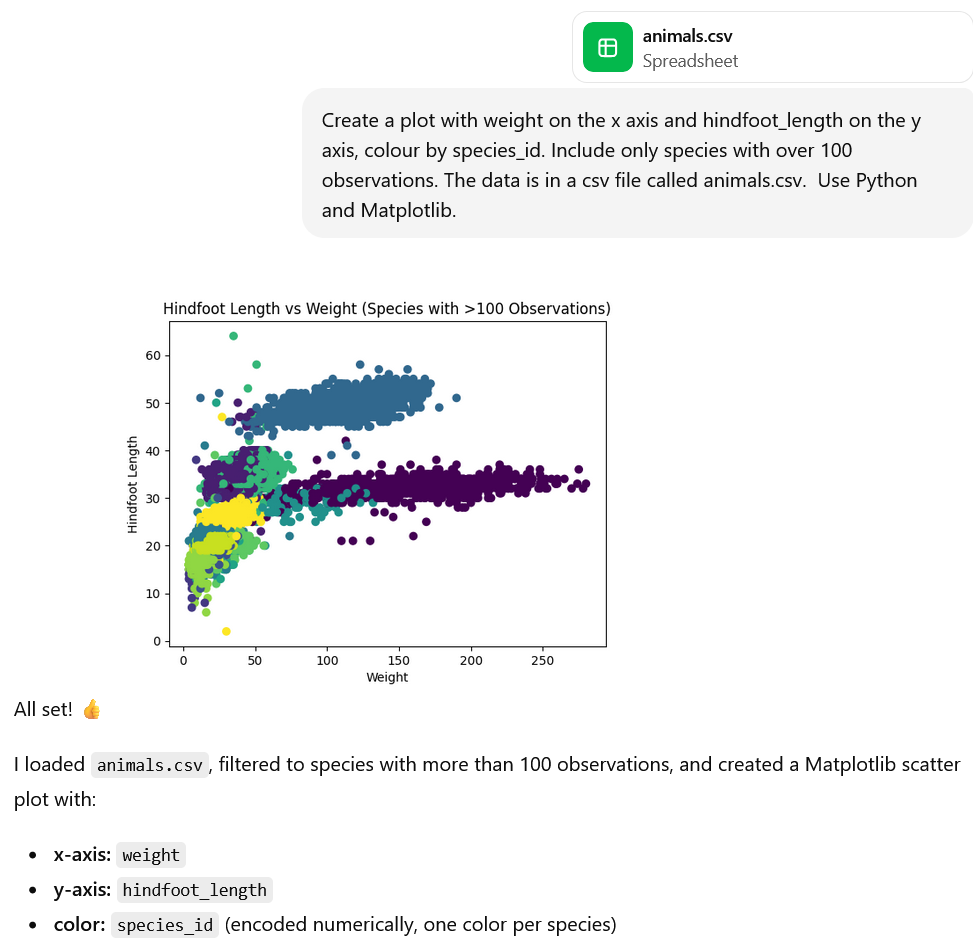
She then realises she could go one step further and upload the dataset to the AI chat so that the analysis can actually be run within the AI tool (depending on the features that you have access to with your AI tool). Note: we can only do this because this dataset is publicly available. Don’t upload any private or sensitive data.
Why Not Just Use AI?
What are the problems with getting an AI tool to write your research code for you? Consider:
- Technical risks
- Reliability risks
- Ethical and academic integrity risks
Which additional problems are introduced when you also use AI to run the code?
Write your thoughts in the shared document.
Artificial intelligence tools can generate code quickly and often convincingly. For researchers who are new to programming, this can be appealing: it may seem efficient to delegate the entire task of software development to an AI system. However, doing so without understanding the solution introduces significant technical, ethical, and reliability risks.
- AI-generated code may appear correct but can contain subtle errors, which may only appear under certain conditions.
- If the researcher doesn’t understand the AI-generated code they can’t verify that the implementation matches the intended analysis and therefore they can’t comprehensively defend their findings.
- The same prompt may produce different solutions at different times, causing problems for reproducibility of your research.
- Generated code may rely on undocumented assumptions.
- Dependencies, versions, or defaults in AI-generated code may change without warning.
- The researcher rather than the AI system will be held accountable for any errors in AI-generated code. When you use AI-generated code you don’t fully understand, you risk being held accountable for any errors in that code.
- Using AI-generated code that you don’t fully understand limits research transparency, as you cannot explain your methods to reviewers and collaborators.
- Using code you do not understand may amount to overstating your expertise or control over the research process, and this misrepresentation is an academic integrity risk.
Additional Problems with AI also Runs the Code
- When AI runs code for you, the execution environment (hardware, operating system, library versions) may be opaque, making results hard to interpret or reproduce.
- The AI can hide warnings, errors, or suspicious behavior, increasing the likelihood that flawed results go unnoticed.
- Uploading data or running code through AI systems can reduce your control over how data is handled, including where it is stored, whether it is logged or reused, and how long it is retained. Without clear guarantees, data may persist beyond its intended use, whether temporarily in memory, in logs, or in backups, creating risks for confidentiality, compliance, and ethical oversight.
- When AI both generates and executes code, researchers may be more likely to trust outputs uncritically, reducing independent verification and scrutiny.
Reduce the Risk of your Data being Reused
By default, generative AI platforms such as ChatGPT will often use your inputs to train the model and improve its performance.
To turn this off, click on your username in the lower left corner -> Settings -> Data Controls -> Improve the model for everyone -> Switch off
Roles for AI in Research Coding
AI tools can be highly valuable when used correctly, as a tool to assist you with your research. The key principle is that they should function as assistants, not autonomous developers.
Appropriate uses of AI include:
- Explaining unfamiliar concepts, terminology or programming frameworks.
- Helping you to spot bugs (problems) in your code and suggesting possible fixes.
- Writing boilerplate code (standard structures for functions, modules etc.)
- Supporting you to write technical documentation.
- Helping to translate ideas into a starting implementation or prototype
In the rest of this episode, we’ll walk through these ways that AI can assist you with coding. We’ll work with the animals data Sally plotted and we’ll run the code using Jupyter notebooks.
Setting up: Data Download and Walkthrough of Jupyter Notebooks
First, download the data from here: animals.csv.
For this session, we’ll run code chunks using Jupyter notebooks.
A Jupyter notebook is an interactive, web-based document that lets you run chunks of code, view their output, and mix in text and visualisations.
You should have already installed Anaconda Navigator which includes a Jupyter Notebooks installation.
- Type ‘Jupyter Notebook’ into the search bar and click on the Jupyter
Notebooks app to open it. (Alternatively, open Anaconda Navigator and
open Jupyter Notebooks from there).
- Let’s first have a look at the engine running Jupyter Notebooks. Click New –> Terminal
From the terminal you can check the version of python that your jupyter notebook will use:
You can also check which python packages are installed by default:
- Head back to the Home tab and create a new folder ‘animals_data_analysis’: New –> New Folder Select the new Untitled folder, click Rename and change the name to animals_data_analysis.
- Click on the animals_data_analysis folder to open it (it will currently be empty).
- Drag and drop animals.csv from your file explorer downloads into this folder. Check the file is called ‘animals.csv’ exactly, rename the file if needed (e.g. if you’ve downloaded it more than once and it’s called animals(1).csv).
- Create a new Jupyter notebook in this folder called ‘animals_plots’: New –> Python 3 (ipykernel) A new Jupyter notebook called ‘Untitled’ will open automatically, click on the name ‘Untitled’ to rename the file to ‘animals_plots’. The file should have the file extension .ipynb which indicates it’s a file of type Jupyter notebook.

- A Jupyter notebook consists of a sequence of cells. These can be code, markdown (a plain-text formatting syntax that allows you to add elements like headers, bold text, and lists without using complex HTML code) or raw (displays content exactly as typed). Check that the cell type dropdown is set to code and type the code below in the cell.
- Press the triangle in the header menu to run the code in the cell
- A new cell will usually be created when you run the previous one. To add another cell manually click the plus sign in the header menu. To remove a cell, click the rubbish bin on the far right of the cell.
- Let’s create a title for our Jupyter notebook using a markdown cell.
Click on your new empty cell and select Markdown from
the cell types dropdown. Type in the markdown cell:
# Animals Data Analysis. (the#formats the text as a heading in markdown). - We probably want our title at the top of the Jupyter notebook. Click
the up arrow in the cell containing
# Animals Data Analysisto move it to the top of the document. With your cursor still in this cell click the run button to render the markdown text as a heading. - Move your cursor back to the cell containing
print('Hello World!')and click the plus sign in the header bar to create a new cell underneath of type ‘code’. This is where we will start typing and running the animals code.
Using AI to Understand Code and Technical Concepts
AI tools like ChatGPT can serve as an interactive reference and tutor, helping you to understand unfamiliar coding constructs, libraries, or data analysis techniques. Unlike traditional search engines, AI can summarise and clarify technical information in context, tailored to your specific dataset, code, or research question.
- Locate technical information quickly: Instead of reading through multiple documentation pages, you can ask AI to find the relevant function, argument, or method for your task.
- Summarise key concepts: AI can condense long documentation into concise, understandable explanations. You can even ask AI to tailor explanations to you code and dataset.
- Clarify ambiguous points: You can follow up iteratively, asking AI to rephrase explanations or provide examples.
- Code comprehension: Paste code generated by AI or colleagues and ask for line-by-line explanations.
- Contextual learning: Ask why certain functions or methods are used, what alternatives exist, and best practices.
Up-skill rather than De-skill with AI
Paste Sally’s code into your AI tool and ask it to explain the code to you. For a more personalised explanation, include in the prompt your current level of python knowledge (beginner, intermediate etc.)
Ask follow up questions if anything is unclear. For example, you could ask for a particular line to be explained or investigate some of the functions or syntax.
Debugging and Error Analysis
Scenario: Sally has realised it’s better long-term if she learns to code herself. She’s written the following Python code to plot weight vs hindfoot length by species using Matplotlib, but when she tries to run it, the code fails with an error.
PYTHON
import pandas as pd
import matplotlib.pyplot as plt

# Load the data
df = pd.read_csv("animals.csv")

# Count observations per species
species_counts = df["species_id"].value_counts()

# Keep only species with >100 observations
valid_species = species_counts[species_counts > 100].index
df_filtered = df[df["species_id"].isin(valid_species)]

# Create the plot
plt.figure(figsize=(10, 6))

for species, group in df_filtered.groupby("species_id"):
    plt.scatter(
        group["weight"],
        group["hindfoot_lenght"],
        label=species,
        alpha=0.7
    )

plt.xlabel("Weight")
plt.ylabel("Hindfoot Length")
plt.title("Hindfoot Length vs Weight (Species with >100 Observations)")
plt.legend(title="Species ID")
plt.tight_layout()
plt.show()
OUTPUT
KeyError: 'hindfoot_lenght'Rather than asking AI to “fix the code,” Sally decides to use it as a debugging assistant to help her understand the error properly.
She enters the prompt “I am getting a KeyError: ‘hindfoot_lenght’ when running the following Python code that uses pandas and matplotlib. Can you help me understand what this error means and how to diagnose it?”
This wording of the prompt will result in explanation rather than just a correction and substitution of the code and will help Sally learn how to diagnose similar problems in future rather than becoming reliant on AI.
In this example, AI might explain that:
- A KeyError in pandas means a column name does not exist
- The issue is likely a mismatch between the dataset’s column names and those referenced in the code
At this point, Sally verifies this claim independently by inspecting the dataset’s column names and checking for spelling inconsistencies.
AI as a Debugging Assistant
The code below contains a different bug. Run the code, use AI to help you debug it, then apply the fix and verify that the code runs as expected.
PYTHON
import pandas as pd
import matplotlib.pyplot as plt

# Load the data
df = pd.read_csv("animal.csv")

# Count observations per species
species_counts = df["species_id"].value_counts()

# Keep only species with >100 observations
valid_species = species_counts[species_counts > 100].index
df_filtered = df[df["species_id"].isin(valid_species)]

# Create the plot
plt.figure(figsize=(10, 6))

for species, group in df_filtered.groupby("species_id"):
    plt.scatter(
        group["weight"],
        group["hindfoot_length"],
        label=species,
        alpha=0.7
    )

plt.xlabel("Weight")
plt.ylabel("Hindfoot Length")
plt.title("Hindfoot Length vs Weight (Species with >100 Observations)")
plt.legend(title="Species ID")
plt.tight_layout()
plt.show()OUTPUT
FileNotFoundError: [Errno 2] No such file or directory: 'animal.csv'Prompt: I am getting the error: FileNotFoundError: [Errno 2] No such file or directory: ‘animal.csv’. Can you help me understand what this error means and how to diagnose it?
The AI’s output may include: - This error is raised by Python when your code attempts to open a file that the operating system cannot locate at the specified path. - The most common causes - the file is not in the current working directory, the filename is misspelled, the file path is incorrect, the file has not been created.
In this case the filename is misspelled as ‘animal.csv’ rather than ‘animals.csv’.
Code Generation
Boilerplate
AI can be particularly useful for some coding tasks that are tedious or repetitive such as writing boilerplate code.
Boilerplate code is a term used to describe standard code structures that are repeated in multiple places with little variation. Examples of boilerplate code across a few different contexts include:
- Templates for function and class definitions
- Setup for plots in python or R
- Basic web page structure in HTML
Using AI to generate boilerplate code can save you time with minimal risk, allowing you to spend your time and effort focusing on the intent of the analysis rather than the programming language’s syntax.
For example let’s try entering the prompt: “Generate boilerplate code to load a csv file and create a histogram of one column”
PYTHON
import pandas as pd
import matplotlib.pyplot as plt

# Load the CSV file
df = pd.read_csv("data.csv")

# Create a histogram for a single column
plt.figure(figsize=(8, 6))
plt.hist(df["column_name"], bins=30)
plt.xlabel("Column Values")
plt.ylabel("Frequency")
plt.title("Histogram of Column Name")
plt.tight_layout()
plt.show()
When you have the boilerplate code, you can edit it to give the desired outcome.
Edit AI-Generated Boilerplate Code
Edit the AI-generated boilerplate code above to produce a histogram of weight:
- Copy and paste the boilerplate into a new code cell of your Jupyter notebook
- Read through the generated boilerplate to make sure it’s doing what you expect
- Change the csv file name to
animals.csv - Change the column_name to
weight - Run the code to produce the histogram
PYTHON
import pandas as pd
import matplotlib.pyplot as plt

# Load the CSV file
df = pd.read_csv("animals.csv")

# Create a histogram for a single column
plt.figure(figsize=(8, 6))
plt.hist(df["weight"], bins=30)
plt.xlabel("Column Values")
plt.ylabel("Frequency")
plt.title("Histogram of Column Name")
plt.tight_layout()
plt.show()
Documentation
Writing thorough code documentation can be time-consuming. This is a major reason why many scripts are left undocumented and are difficult to understand later, either by others or by yourself. AI can help by generating documentation automatically, making it faster to produce clear, understandable explanations of your code.
For example, if we extract plotting code into a function like
plot_species_scatter, we can use AI to generate a docstring
for the function. A docstring in Python is a short note
written at the start of a function that explains what it does, what
inputs the function takes, and what the function outputs.
Note that there are a few different styles of docstring for python: Google style , Sphinx style , NumPy style, and Epytext style. If the code you’re working with follows a particular style, you can specify the style of docstring in your prompt.
PYTHON
def plot_species_scatter(df, species_col="species_id", x_col="weight", y_col="hindfoot_length", min_count=100):
    df_filtered = filter_species_by_count(df, species_col, min_count)

    plt.figure(figsize=(10, 6))

    for species, group in df_filtered.groupby(species_col):
        plt.scatter(
            group[x_col],
            group[y_col],
            label=species,
            alpha=0.7
        )

    plt.xlabel(x_col.capitalize())
    plt.ylabel(y_col.replace("_", " ").capitalize())
    plt.title(f"{y_col.replace('_', ' ').capitalize()} vs {x_col.capitalize()} (Species with >{min_count} Observations)")
    plt.legend(title=species_col)
    plt.tight_layout()
plt.show()Generate a Docstring
Copy and paste plot_species_scatter function from above
into your AI tool and ask the AI to generate a docstring for the
function.
If you know Python, verify that the docstring accurately represents what the code does. More specifically, check that the listed parameters match the function’s arguments and confirm that any descriptions of functionality align with the actual code logic.
If you don’t know Python, read through the docstring and use it to help you understand what the function does.
Prompt: Generate a docstring for the following function:
PYTHON
def plot_species_scatter(df, species_col="species_id", x_col="weight", y_col="hindfoot_length", min_count=100):
    df_filtered = filter_species_by_count(df, species_col, min_count)

    plt.figure(figsize=(10, 6))

    for species, group in df_filtered.groupby(species_col):
        plt.scatter(
            group[x_col],
            group[y_col],
            label=species,
            alpha=0.7
        )

    plt.xlabel(x_col.capitalize())
    plt.ylabel(y_col.replace("_", " ").capitalize())
    plt.title(f"{y_col.replace('_', ' ').capitalize()} vs {x_col.capitalize()} (Species with >{min_count} Observations)")
    plt.legend(title=species_col)
    plt.tight_layout()
    plt.show()
Example AI - generated docstring:
PYTHON
    """
    Creates a scatter plot of two numerical variables for species with a minimum number of observations.

    The function filters the input DataFrame to include only species that have more than `min_count`
    observations, then plots `x_col` vs `y_col` for each species as separate scatter points with a legend.

    Parameters:
        df (pd.DataFrame): The input DataFrame containing the data.
        species_col (str, optional): Column name representing species IDs. Defaults to "species_id".
        x_col (str, optional): Column name for the x-axis values. Defaults to "weight".
        y_col (str, optional): Column name for the y-axis values. Defaults to "hindfoot_length".
        min_count (int, optional): Minimum number of observations required for a species to be included. Defaults to 100.

    Returns:
        None. Displays a matplotlib scatter plot.

    Example:
        >>> plot_species_scatter(df, species_col="species_id", x_col="weight", y_col="hindfoot_length", min_count=50)
"""Which other coding tasks can benefit from AI assistance?
- Improving or optimising your code e.g. “Can you refactor this code to move the species-filtering logic into a small function, without changing its behaviour?”
- Generating first drafts or rapid prototypes
- Translating code between programming languages (Make sure you understand the translation so that you can troubleshoot, extend, or adapt it safely for future analyses!)
Which coding tasks could AI help you with?
When you next have to write some code for data analysis or software development, which tasks would you use AI tools to assist with?
Integrating AI Tools into IDEs
In this episode, we have used separate interfaces to interact with AI and to run our code. As of 2025 this was the most common way that researchers interacted with AI for coding assistance. However, it is also possible to integrate AI into an environment you use to write and run code (known as an Integrated Development Environment or IDE). For example, an AI assistant called GitHub Copilot can be integrated IDEs such as Visual Studio Code. There are some advantages and disadvantages to this integrated approach:
Advantages of using an IDE-Integrated AI Assistant
- Context awareness: Integrated AI can access the files and project structure in your IDE, making suggestions that are relevant to your current codebase.
- Immediate feedback and autocompletion: As well as the AI chat tool that we’ve been using in this session, IDE-integrated AI also offers autocompletion and code suggestions as you’re typing.
- Seamless workflow: You don’t have to switch between windows or copy-paste code. Everything happens in one environment, which can reduce cognitive load.
Disadvantages of using an IDE-Integrated AI Assistant
- Limited explanation: Unlike a standalone AI like ChatGPT, IDE-integrated AI often provides suggestions without detailed reasoning. This can reduce researchers’ understanding of AI-generated code
- Potential over-reliance: It can be very tempting to accept AI code suggestions that appear to work, without fully understanding them, and this can lead to errors or misunderstandings about what your code does.
- Privacy and security risks: The AI may send code snippets to cloud services for processing. Sensitive data or unpublished research could be exposed if this is not carefully managed.
For training on IDE-integrated AI assistants see Developing Research Software with AI Tools
- Delegating full software development to AI without understanding the
code introduces technical, ethical, and reliability risks.
- AI tools should function as assistants, not autonomous developers,
supporting learning, debugging, and code generation.
- Researchers can use AI to explain unfamiliar code line by line,
helping them understand programming constructs and libraries.
- AI can assist with debugging by explaining errors and suggesting
possible fixes, but researchers should independently verify
solutions.
- AI is useful for generating boilerplate code, performing basic
refactoring, and drafting technical documentation, saving time on
repetitive tasks.
- Integrating AI into IDEs offers contextual suggestions and autocompletion, but carries risks of over-reliance, limited explanation, and potential privacy concerns.
Content from Ethics, Reliability and Security Considerations
Last updated on 2026-07-09 | Edit this page
Estimated time: 60 minutes
Overview
Questions
- What are some risks of biased, inaccurate, or unreliable AI-generated outputs?
- How can the use of AI tools compromise data privacy, security, or confidentiality in research and software development?
- What intellectual property and authorship issues emerge when AI contributes to code or written work?
- What are the long-term consequences of researchers relying on AI without developing core coding skills?
- What best practices can ensure that AI is used responsibly, ethically, and transparently in research workflows?
Objectives
- Describe common sources of bias, inaccuracy, and unreliability in AI-generated outputs.
- Explain data privacy, confidentiality, and security risks associated with using AI tools in coding and research contexts.
- Summarize intellectual property, authorship, and citation considerations related to AI-generated code and text.
- Analyze the potential long-term consequences of researchers relying on AI tools without developing foundational coding skills.
- Examine ethical challenges introduced by AI-assisted research, including accountability, transparency, and reproducibility.
- Assess the appropriateness of AI tool usage in specific research or coding scenarios.
- Apply best practices to mitigate ethical, security, and skills-related risks when using AI in research.
- Develop personal or team-level guidelines for responsible and ethical AI use in coding and data analysis workflows.
Overview
Understanding the risks and implications of AI is critical to using AI tools for coding safely, effectively, and with confidence. In this episode, we’ll take a brief look at issues related to:
- Errors, biases and security issues in AI-generated code
- Intellectual property of AI-generated code
- De-skilling and overdependence on AI in research computing
- Best practices for responsible AI use in research
Errors, Security Issues and Biases in AI-Generated Code
Errors
AI coding assistants can produce both random and systematic errors, threatening the reliability and reproducibility of your work. For instance, a 2023 study evaluating the code quality of AI-assisted generation tools found that ChatGPT generated correct code 65.2% of the time and GitHub Copilot generated correct code only 46.3% of the time. However, given the rapid improvements to generative AI over the past few years, it may not be fair to suggest these figures are representative of outputs generated by the current models used by ChatGPT and GitHub Copilot.
Nonetheless, this study underscores the potential danger of depending solely on AI tools for critical research tasks without carefully reviewing the outputs.
There are a few different reasons for errors occurring in AI-generated code. These include:
One reason is that there are likely to be errors in the training data. Many large language models have been trained on vast amounts of publicly available code, some of which contains mistakes. As a result, AI-generated code can inherit these errors without any indication that they exist.
Another reason for error is that when the model lacks relevant training data or encounters an unfamiliar task, it may invent code or logic rather than responding with uncertainty. This can produce outputs that are plausible but incorrect, a phenomenon often called a hallucination.
AI-generated code may be outdated. An AI model is trained on vast amounts of publicly available code, including code written many years ago, and is only aware of information up to the date that it was pre-trained, which may be several months in the past. Therefore, the AI may not produce code that follows the most up to date standards. For example, the AI might suggest a function from an open-source library that hasn’t been well-maintained over the past few years.
Using AI to write your code without having a structured plan can lead to messy and confusing code that difficult to understand and maintain, increasing the risk of error.
Vibe Coding
Vibe Coding is a term used to describe AI-assisted coding without a structured plan, proper design, or architectural considerations. Decisions are made on the fly, often based on intuition or immediate needs rather than a thoughtful development strategy.
Andrej Karpathy, co-founder of OpenAI and one of Time Magazine’s 100 Most Influential People in AI in 2024, has said about vibe coding: “There’s a new kind of coding, I call ‘vibe coding’, where you fully give in to the vibes, embrace exponentials, and forget that the code even exists. It’s possible because the LLMs … are getting too good.
“When I get error messages I just copy [and] paste them in with no comment, usually that fixes it … I’m building a project or web app, but it’s not really coding – I just see stuff, say stuff, run stuff, and copy paste stuff, and it mostly works.”
This can be fantastic for developing a quite prototype or trying out an idea. However, coding in this way can also lead to some major problems:
- Without planning the structure of your code at the start, programs are likely to become messy and confusing, and this can introduce mistakes into the code.
- Outputs are likely to appear mostly correct and, while obvious errors are usually caught, the subtle mistakes are easy to miss.
- This approach is likely to lead to problems being discovered only during the build or runtime phase instead of during design, which makes them more time-consuming and costly to fix.
Security Issues
Data Privacy and Confidentiality
It’s really important to be cautious that you don’t accidentally share confidential code, sensitive datasets or proprietary research methods with an AI tool. Depending on the settings of your AI tool, the information you enter may be reused to improve the AI model and/or could resurface in future outputs, creating risks around intellectual property leakage, confidentiality breaches, or non-compliance with data protection regulations.
Security Risks in AI-Generated Code
A 2023 Stanford University study found that programmers who used AI assistants often produced less secure code but at the same time, felt more confident that it was secure - a risky combination!
Some of the errors in AI-generated code can pose security risks for your software.
For example, AI tools sometimes hallucinate non-existent coding packages in their outputs. A study by the security company Vulcan identified a cyberattack technique where criminals would publish a malicious package under the name of the hallucinated package, hoping that AI would suggest the same package to other users, who would then install the cyber criminals’ malicious package based on the AI tool’s recommendation.
This practice has become known as ‘slopsquatting’, a combination of ‘AI Slop’ and ‘typosquatting’ (the practice of registering domain names or software package names that are slightly misspelled versions of popular ones to trick users into visiting them or downloading malicious content).
Embed a ‘security conscience’ into the AI
A Security-Focused Guide for AI Code Assistant Instructions was written by the OpenSSF Best Practices and the AI/ML Working Groups. The guide suggests ways that you can improve the security of AI-generated code by deliberately embedding security expectations into the prompts. These might include:
- Secure coding best practices that are relevant for your code (e.g. Input validation and output encoding, error handling and logging, secure defaults and configurations, testing for security)
- Reminders of software supply chain security (i.e. security of suggested third-party libraries and dependencies)
- Address relevant platform and runtime security considerations (e.g. operating system, deployment considerations, mobile app security)
- Language-specific security considerations
- Pointing the AI toward relevant security standards and frameworks
Note: Including security expectations in prompts requires knowledge of relevant software security practices, so is outside the scope of this novice course. However, it’s worth bearing in mind if you’re interested in developing research software.
Bias
AI-generated code can contain undocumented assumptions that reflect biases in the model’s training data. These assumptions may lead to code or documentation that unintentionally favours certain demographic groups over others.
Biases in User Validation
Scenario
Sally wants to make a web-based tool that allows other researchers to create an account and log in to explore the animals data. She asked an AI tool to write a function that validates a name on a user profile, and the following code is generated.
What are some biases or assumptions in this code? Write your thoughts in the shared document.
Hint: If you do not understand the code, use the docstring to understand what the function does.
PYTHON
import re

def is_valid_name(name: str) -> bool:
    """
    Returns True if the name is valid.
    A valid name contains a first name and a surname.
    It contains only alphabetic characters and starts with a capital letter.
    """
    pattern = r"^[A-Z][a-z]+(?: [A-Z][a-z]+)*$"
return bool(re.match(pattern, name))- The code that only allows Latin letters and Western capitalization patterns, implicitly assuming names are formatted as “First Last”.
- These undocumented assumptions exclude valid names from many cultures (e.g., letters with accents, apostrophes, non-Latin scripts, or single-word names), reflecting biases in the model’s training data.
Intellectual Property of AI-Generated Code
Intellectual property rights for AI-generated code are currently evolving.
Currently in the UK, if a person creates some work using AI, the content is the human’s own intellectual creation and the copyright belongs to the human creator or person “by whom the arrangements necessary for the creation of the work are undertaken”.
However, there’s ongoing debate about how this practically applies to many forms of AI outputs, including software code, because the statutory language was drafted long before modern AI and doesn’t map cleanly to current AI models.
It’s also worth considering that ownership can depend on contractual terms, such as employment contracts or AI tool terms of service, which may assign rights to an employer or platform rather than the individual user.
AI-Generated Code May Contain Copyrighted Material
AI models are trained on a vast amount of data that may include copyrighted material. Therefore, there’s a risk that AI-generated code may closely resemble the copyrighted code from its training data.
If you add AI-generated code to an open-source project, you may unintentionally introduce a licensing conflict if the AI-generated patterns or structures of the code originate from software under incompatible licences. This could lead to the open-source project facing copyright infringement claims.
No AI-generated Code Policy for Open-Source Project Cloud Hypervisor
Cloud Hypervisor is an open-source software project that helps large computing systems run multiple programs safely and efficiently at the same time, which is a common requirement in cloud services (services provided over the internet rather than from a local computer). In 2025, the project’s maintainers implemented a no AI-generated code policy for contributions, out of concern that such code might unintentionally include material derived from other software with incompatible licences, creating legal risks for the project and its users.
In a post on GitHub, Cloud Hypervisor’s maintainers said: ‘Our policy is to decline any contributions known to contain contents generated or derived from using Large Language Models (LLMs). This includes ChatGPT, Gemini, Claude, Copilot and similar tools.’
De-Skilling and Overdependence on AI in Research Computing
AI tools can significantly enhance productivity in research computing, but excessive reliance on them introduces risks to research quality, integrity, and long-term capability.
Risks of De-Skilling
Over-reliance on AI for coding can prevent researchers from developing essential skills in research software development and data analysis. Without a solid understanding of the code you use, you can’t reliably verify whether your research results are correct, reducing confidence in the validity of any results you publish.
There are also long-term implications for the research community. If researchers become dependent on AI tools for software development tasks, institutions risk losing the collective ability to design, build, and maintain research software independently. This creates problem if tools become unavailable, restricted, or unsuitable for specific research needs.
Therefore, rather than skipping learning to code because AI can handle it, this is precisely the time to strengthen your research computing skills.
Preserving Critical Thinking in the Age of AI
A common bias among AI users is the tendency to over-value AI-generated outputs. Outputs from GPT systems often have an authoritative tone, which can make us inclined to accept the output without critically evaluating it.
However, maintaining human judgement is especially important in research, where novelty, insight, and deep understanding often matter more than speed.
Therefore, it’s important that we avoid uncritical trust in AI and instead treat AI outputs as suggestions rather than solutions. Also, remember that you as the researcher need to take responsibility for any AI-generated code you use.
Personal Ethics and Security Policy
Bearing in mind the ethical, reliability and security considerations from this episode, write yourself some guidelines for how you will use AI tools responsibly to assist with coding.
e.g. Sally’s personal ethics and security policy for using AI tools for research coding is:
- Make sure I understand any code generated by AI before using it for my research.
- Never input sensitive, personal, or proprietary data into AI systems.
- Maintain my critical thinking and decision making skills, never allow AI to do these things for me.
- AI-generated code is not fully reliable: it may contain subtle
errors, outdated functions, or fabricated solutions (hallucinations)
that compromise research validity and reproducibility.
- Vibe coding (AI-assisted coding without planning) can produce messy, error-prone programs. Structured development and verification remain essential.
- Using AI tools can create data privacy, confidentiality, and
security risks, especially when submitting sensitive datasets or
proprietary code to cloud-based AI services.
- AI may suggest insecure or outdated coding practices. To mitigate
the risk you could embed security expectations in prompts and review
outputs critically.
- Be aware of the evolving issues surrounding intellectual property of
AI-generated code.
- Over-reliance on AI can lead to de-skilling, reducing researchers’
coding proficiency, critical thinking, and long-term ability to maintain
software.
- Ethical AI use requires human oversight, responsible data practices,
defined boundaries, transparency, and validation of AI-generated
outputs.
- It could be helpful for researchers to develop personal or team-level AI ethics and security policies.
References
- AI-Assisted Coding with Codium, Ethical and Security Considerations
- Perry, N., Srivastava, M., Kumar, D., & Boneh, D. (2023, November). Do users write more insecure code with ai assistants?. In Proceedings of the 2023 ACM SIGSAC conference on computer and communications security (pp. 2785-2799)
- Yetiştiren, B., Özsoy, I., Ayerdem, M., & Tüzün, E. (2023). Evaluating the code quality of ai-assisted code generation tools: An empirical study on github copilot, amazon codewhisperer, and chatgpt. arXiv preprint arXiv:2304.10778.
- Now you don’t even need code to be a programmer. But you do still need expertise
- UK Government Consultation on Copyright and Artificial Intelligence
- Rana, N. K. (2025). Generative AI and academic research: A review of the policies from selected HEIs. Higher Education for the Future, 12(1), 97-113.
- Duke University Libraries guide to citing artificial intelligence
- Cloud Hypervisor says no to AI code - but it probably won’t help in this day and age
- Ethical AI Framework by Vilas Dhar
- What is Generative AI? - LinkedIn Learning
- Security Focused Guide for AI Code Assistant Instructions
- ChatGPT Hallucinations Can Be Exploited to Distribute Malicious Code Packages