
3.2 Sprint Review
Last updated on 2026-02-19 | Edit this page
Overview
Questions
- How do you conduct a Sprint Review?
- What are some strategies for communicating effectively with clients during a Sprint Review?
- How can you effectively manage change in a software project?
- How can you convert feedback from clients into product backlog items?
Objectives
- Define the key elements of a Sprint review meeting
- Understand how to communicate effectively with a client in a sprint review meeting
- Outline some strategies for dealing with changes in requirements
Sprint Review
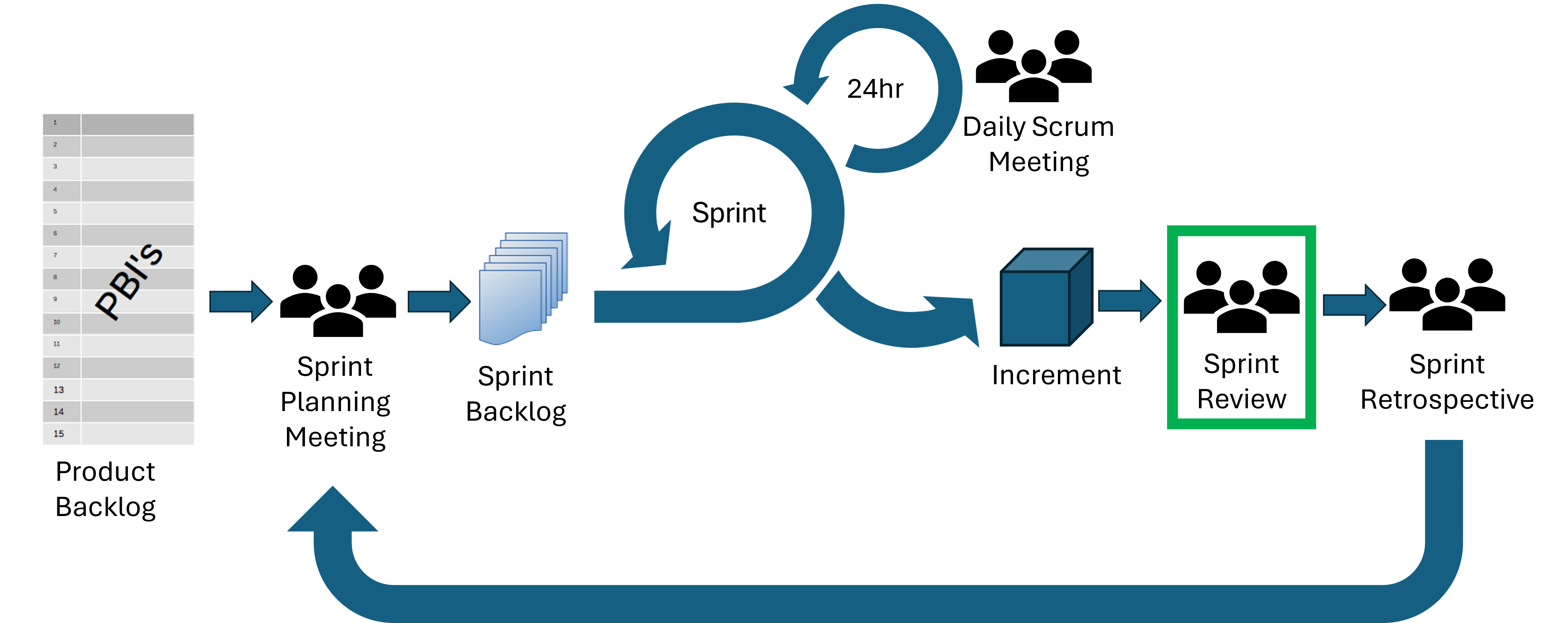
A Sprint Review takes place at the end of each sprint and brings the Scrum Team together with clients and other stakeholders. It is an opportunity for everyone involved to see what has been accomplished during the sprint and to reflect on progress together.
During the review, the Scrum Team shares the work they have completed, often by demonstrating new or updated features. Stakeholders are encouraged to ask questions, give feedback, and discuss priorities. This conversation helps the team decide what to focus on next and highlights any changes in requirements or circumstances that could affect future work. The Product Backlog is then updated to reflect these new insights.
A Sprint Review should be a collaborative working session rather than just a presentation.
The Sprint Review would be timeboxed to four hours for a one month Sprint but will be much shorter, only 30 minutes, for our mini Sprint.
Strategies for Communicating Effectively with a Client during a Sprint Review
- Focus on demonstrating real work. Show working features rather than describing them in abstract terms. This helps clients understand progress clearly and gives them confidence in what has been achieved.
- Explain decisions and context. Briefly explain why certain approaches were taken, especially if there were constraints or trade-offs. This helps stakeholders understand the reasoning behind the work and reduces misunderstandings.
- Listen actively to feedback. Pay close attention to what clients say, and avoid interrupting or dismissing their comments. Ask clarifying questions to ensure you understand their perspective. This shows respect and helps avoid incorrect assumptions.
- Avoid becoming defensive. Feedback is intended to improve the product, not criticise individuals. Respond calmly and professionally, even if the feedback is unexpected.
- Be honest about progress and limitations. Be clear about what is complete, what is still in progress, and any challenges the team has encountered. Transparency builds trust and helps stakeholders make informed decisions.
- Confirm shared understanding. Summarise key points and agreed changes at the end of the discussion. This ensures everyone has the same expectations and helps you update the Product Backlog accurately after the meeting.
Group Exercise: Communicating Effectively
(5 minutes)
Read the example statements below. For each one, discuss in your groups whether it is effective or ineffective communication during a Sprint Review.
- “We implemented the login feature. Let us show you how it works.”
- “That requirement was unclear, so we did not implement it.”
- “Can you clarify how you expect users to interact with this feature?”
- “We did it this way because it was easier for us.”
- “This part is not finished yet, but here is our current progress.”
- Effective — Demonstrates real work and invites stakeholder engagement.
- Ineffective — Sounds defensive and shifts blame. A better approach would be to explain the uncertainty 3. earlier and ask for clarification.
- Effective — Shows active listening and a willingness to understand stakeholder needs.
- Ineffective — Focuses on developer convenience rather than user or project value.
- Effective — Honest and transparent about progress, which builds trust.
Managing Change
Feedback from stakeholders during the Sprint Review may highlight new requirements, changes to existing features, or changes to the relative importance of planned work. Changes in requirements are normal and but can be difficult to manage well.
There are some strategies you can use to manage change in a way that keeps the project focused and sustainable:
- Record changes clearly. All requested changes should be documented in the Product Backlog. This ensures that nothing is forgotten and allows the team to review and prioritise changes in an organised way.
- Prioritise changes based on value. Not all changes are equally important. The Product Owner should work with stakeholders to decide which changes will deliver the most value. This helps the team focus their effort where it will have the greatest impact.
- Break changes into manageable chunks. Large or unclear changes should be divided into smaller backlog items. This makes them easier to understand, estimate, and implement, and reduces the risk of misunderstandings.
- Discuss and clarify requirements. Take time to ask questions and confirm what stakeholders need. This reduces the risk of rework and ensures the team is solving the right problem. Keep stakeholders informed about how changes affect timelines, priorities, and scope.
Communicating Effectively About Change
When you’ve invested a lot of time and effort in a piece of work, it can feel really frustrating when the product requirements change and your work needs to be changed or removed from the product. It’s natural to feel this way, but it is equally important to remain professional and open to feedback. Try to reframe the change as part of an ongoing improvement process rather than as something that makes your previous work a waste of time!
Group Exercise: Feedback -> Backlog Items
(5 minutes)
Imagine your group has demonstrated a data processing pipeline that analyses experimental results and produces summary statistics.
The client gives the following feedback:
“This is useful, but we need more flexibility. Different research groups use different file formats, and sometimes the column names are slightly different. We also need to run this on large datasets on our computing cluster, not just locally. Finally, it would help if errors were easier to understand, because students will be using this.”
In your groups, identify at least three concrete Product Backlog items that could be created from this feedback.
Possible backlog items include:
- Add support for configurable input file formats
- Allow column names to be mapped using a configuration file
- Add command-line interface options for specifying input schema
- Enable execution in a non-interactive environment suitable for cluster use
- Improve error messages to clearly explain the cause and possible fixes
- Add input validation with informative feedback for missing or malformed data
- Provide documentation and examples for common use cases
- Add logging to help users diagnose failures
Prepare for the Sprint Review
It’s important to plan the Sprint Review in advance. You’ll have 30 minutes to plan before the Sprint Review later in this session. As a rough structure your Sprint Review plan should include:
Structure for the Meeting
- Inspect the outcome of the Sprint. This may be a demonstration or presentation.
- Discuss the progress toward the Product Goal. How does what you’ve created meet the requirements for the product? What is currently missing?
- Discuss any changes in the environment. This may include changes in the marketplace, customer behavior and customer feedback. Make a note of any changes so that you can include them in the product backlog later on. If the client asks for any changes that you don’t understand or might have problems implementing, make sure you ask them to clarify.
- Discuss what to do next. Consider the current priorities for the project and prepare to update the product backlog after the meeting.
Roles
- Decide who will start the meeting and introduce the demonstration.
- For every element of the product, it’s best if the Developer(s) who worked on that element lead the discussion. It’s usually a bad idea for the Product Owner to lead the discussion on all the topics.
- Make sure you keep notes on the Sprint Review. It can be helpful to assign the role of note taker to one person.
Prepare for the Sprint Review
Take 30 minutes to prepare for the Sprint 1 Review.
- Prepare your demonstration and decide who will present each element
- Write a structure (or agenda) for the meeting
- Consider how your progress has moved the project toward the Product Goal
- Prepare any questions you have for the client
- Decide who will take on each role
Sprint 1 Review Meeting
Teams conduct the Sprint Review meeting with the clients (30 mins).
Update Product Backlog
Teams spend 15 minutes updating the Product Backlog (15 mins).
- A Sprint Review occurs at the end of a sprint and brings together the Scrum Team, clients, and stakeholders to inspect completed work and adapt future plans.
- Demonstrating real work and explaining context helps stakeholders understand progress and provide meaningful feedback.
- Active listening, asking clarifying questions, and avoiding defensiveness are essential for professional communication.
- Changes to requirements are normal; they should be documented, prioritised, and broken into manageable backlog items rather than implemented mid-sprint.
- Reframing changes as part of an ongoing improvement process helps manage frustration and maintain professionalism.
- The Product Owner maintains the Product Backlog, incorporating stakeholder feedback and updating priorities.
- Planning the Sprint Review supports a smoother and more productive meeting.